Standardize kakobuy Brand Page and Google Sheets Entries
Standardize kakobuy Brand Page and Google Sheets Entries
What Task Does This Brand Record Comparison Solve
When the same brand appears in product catalogs, brand pages, and spreadsheets with different spellings, filtering, deduplication, and subsequent verification become difficult. This guide addresses a specific task: consistently recording the visible brand name from a brand page into the Brand column of Google Sheets or a web-based spreadsheet, while preserving aliases, sources, and verification status.
After completion, you should be able to:
Establish a standardized brand value for each product.
Keep the displayed name from the original page separate from the internal standard name.
Flag records with missing, duplicate, or unverifiable brands.
Organize a filterable candidate list before continuing to check product pages.
This article does not apply to authenticating genuineness, judging materials, verifying inventory, comparing shipping costs, or deciding whether to purchase. Brand pages can only help organize catalogs and cannot replace product page verification. 📋

Confirming Visible Names and Entry Points on kakobuy Brand Pages
First, open the Brands entry on the site, then use the brand categories or search area on the page to locate the target brand. When recording, base it on the name actually displayed on the page, not on rewritten names from memory.
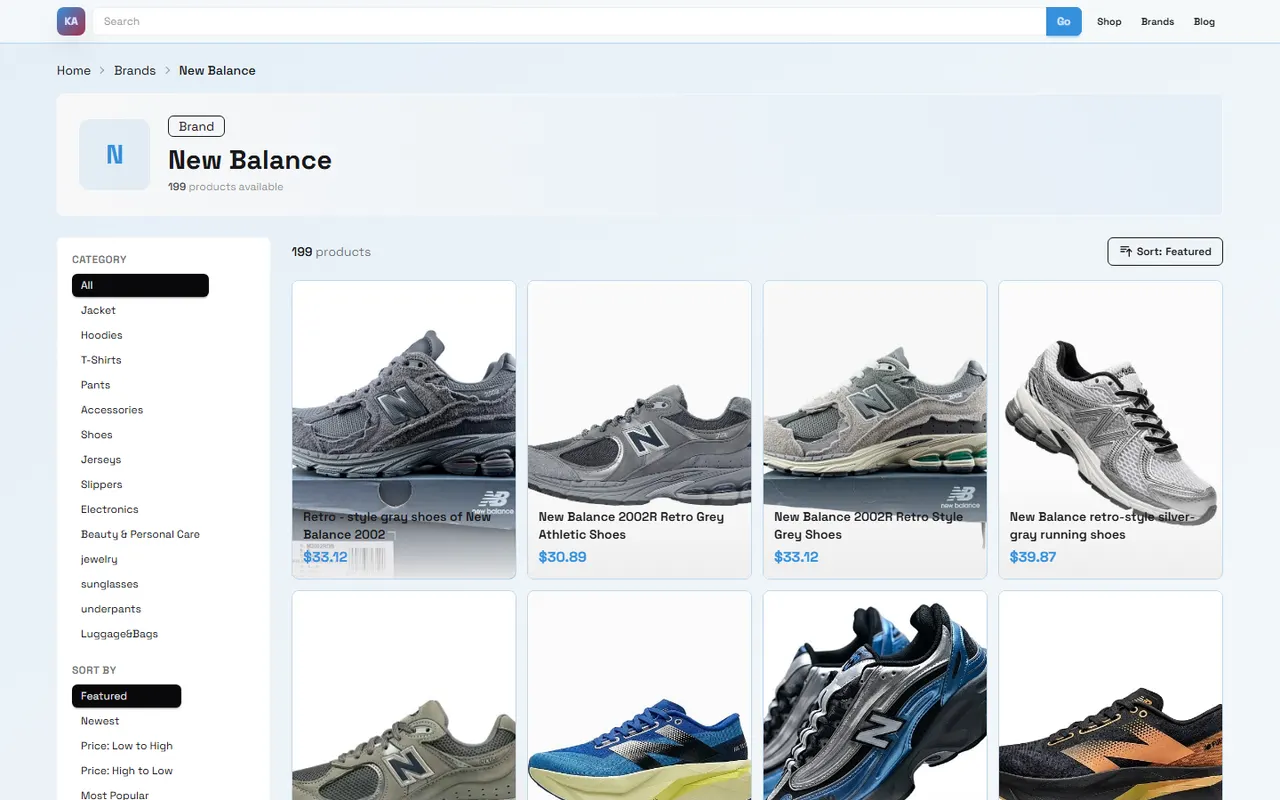
The page screenshot shows that the brand page contains the following observable information:
Brand name and brand page title.
Number of available products.
Product category filters.
Sorting options, such as Featured, Newest, Price, and Popularity.
Pagination information.
Visible titles and price information in product cards.
This guide only uses this visible information to explain the recording method. Product titles, prices, and quantities on the page may change, so reopen the page to verify before publishing and fill in the verification date in the spreadsheet. The quantities in the screenshot cannot be directly used as current inventory, nor can they prove that a product is still purchasable.
It is recommended to first create a brand-level record, then split product-level information into a product sheet row by row. Brand-level records address "what is this brand page called and where did you find it"; product-level records address "what is this product's title, link, and status". Do not mix these two types of information in the same cell. 🔎
How to Set Up Brand, Alias, and Source Columns in Google Sheets
The brand table should contain at least the following fields:
Field | Recorded Content | Purpose |
|---|---|---|
Standard Brand Name | The name uniformly used by the team | For filtering, statistics, and deduplication |
Page Display Name | The name actually displayed on the brand page | Preserve original visible evidence |
Alias or Variant | Differences in case, spaces, hyphens, etc. | Assist matching, not replace standard name |
Source Type | Brand page, product page, or other site pages | Explain where the name comes from |
Source URL | Page address or internal reference | Facilitate revisiting the original page |
Verification Date | Date the page was last opened | Distinguish current records from old ones |
Verification Status | Confirmed, needs review, missing, or conflict | Control subsequent processing order |
There can only be one version of the standard brand name. The page display name must be preserved as is and cannot be overwritten for uniformity. Alias columns are for searching and merging, not for direct use as the final display name.
If multiple staff members maintain the spreadsheet together, agree on case, space, and hyphen rules before starting entry. For unverifiable names, use "Needs Review" rather than directly assigning them to a similar brand. ✅
Which Fields Should Be Checked Separately for Product Cards and Table Rows
Brand pages are suitable for confirming catalog hierarchy and brand entries; product cards are for discovering candidate records; product pages are for confirming specific product fields. The three serve different purposes.
When entering a product row, at least check:
Is the product title fully visible?
Does the product's brand match the brand page record?
Is the product category filled in correctly?
Can the product page be opened normally?
Is there clear seller or source information on the page?
Do time-sensitive fields such as price, inventory, size, model, and images need re-verification?
Does a record already exist to avoid duplicate entry of the same page?
Product titles on cards may be seller-customized text, so brand attribution cannot be judged solely from the title. If the brand page name differs from the product page name, keep both values and explain the conflict in remarks. Do not expand a product card's short title into unverified model, material, or series names.
How to Flag Inconsistent, Duplicate, or Missing Brand Names
You can use the following processing order:
First preserve the page display name.
Then perform exact and normalized matching with the standard brand name.
If there are only differences in case, spaces, or hyphens, record as "Format Difference".
If names are obviously different but may refer to the same brand, record as "Needs Review".
If the product page has no brand information, record as "Not Shown on Page" and do not fill in a name yourself.
If the same product is entered multiple times, keep one master record and mark the others as "Duplicate Pending".
Normalized matching can help discover problems, but it cannot automatically replace human judgment. It is recommended to add a separate "Match Result" column, such as "Exact Match", "Format Difference", "Suspect Same Brand", "Cannot Confirm". This allows filtering while preserving the judgment process. ⚠️
Applicability Boundaries Between Web-Based Spreadsheets and Google Sheets
Google Sheets is more suitable for team collaboration, filtering, batch field supplementation, and retaining simple edit history. Web-based spreadsheets are better for displaying organized content to visitors or as part of on-site categories and content pages.
The two can be used together, but they should not overwrite each other's original evidence. It is recommended to adopt the following division of labor:
Google Sheets stores work records, sources, verification dates, and internal status.
Web-based spreadsheets display curated public fields.
Product page verification results are confirmed in the internal table before syncing to public pages.
Unconfirmed names should not be directly used as public categories.
If you are only organizing brand names and candidate products, Google Sheets is usually sufficient. If you need multi-person maintenance, public filtering, or linking to on-site content pages, then consider syncing to a web-based spreadsheet. Do not omit sources and verification status just because the page looks more complete.
What Brand Information Still Requires Opening Product Pages for Verification
Brand pages only provide catalog-level entries. The following information must be confirmed on specific product pages:
Complete product title and variants.
Seller name or page source.
Current price and inventory status.
Sizes, colors, models, and specifications.
Materials, dimensions, and packaging descriptions.
Whether product images match the current page.
Return/exchange conditions and enforceable after-sales windows.
Whether the page is still accessible.
Price, inventory, seller, link status, and after-sales conditions are all highly volatile facts. Each time before publishing or ordering, recheck and update the verification date in the spreadsheet. Do not treat product quantities, sort results, or card titles on brand pages as long-term stable information.
Filtering and Candidate Organization Checklist After Unified Recording
After unifying the brand column, you can organize candidate records in the following order:
Filter rows where "Standard Brand Name" is exactly the same.
Separately review "Needs Review" and "Not Shown on Page" records.
Delete or merge duplicate product rows, but first retain original sources.
Sort by product category, verification status, and date.
Open product pages and add specific product fields.
Re-verify prices, inventory, sizes, and link status.
Mark completed records as "Confirmed".
Mark pages that are no longer accessible as "Link Broken", not directly as current products.
The final list should be able to answer four questions: which standard brand does this record belong to, what is the page's original text, where does the evidence come from, and what still needs verification next. As long as one of these questions has no answer, the record should not be considered complete.
The value of unifying the brand column lies in reducing duplication and mismatching, not replacing product page judgment. What is saved after organizing is filtering time; the increased risk is over-reliance on brand pages while ignoring product page differences. It is suitable for those who need to organize catalogs in bulk, maintain candidate lists, or collaborate on data entry; it is not suitable for confirming authenticity, ensuring inventory, or directly making purchase decisions. 🚚
Article Images
Agent Platform Shopping FAQs
1. What is the reason for using spreadsheets on kakobuy?
Agent platforms such as kakobuy typically do not showcase products in a direct manner, making it necessary for you to employ a spreadsheet to look up desired items and locate their corresponding purchase links. Should you prefer an alternative, you could seek advice on Reddit or Discord; the items suggested there are generally of high quality, though the purchasing procedure tends to be time-consuming. These spreadsheets are commonly assembled over an extended duration by collecting information from those platforms.
2. On kakobuy, what should you do if you are not satisfied with the received product?
For kakobuy, you should get in touch with the customer service department of the agent platform without delay. Regarding Chinese merchants, the majority of non-specialty products are covered by a 5-day unconditional return and exchange guarantee. In case you are unhappy with the purchase, you can ask for the item to be returned. If the goods have already been dispatched from the warehouse and reached your location, and you then identify a defect, you are required to contact kakobuy's customer service team so they can assist you in communicating with the seller to work out a solution for compensation.
The following are the customer service email addresses for each platform:
kakobuy: [email protected]
oopbuy: [email protected]
usfans: [email protected]
hipobuy: [email protected]
superbuy: [email protected]
3. Why doesn't kakobuy use Google Sheets?
Google Sheets is workable only when the spreadsheet contains a modest quantity of products. As the product count grows, the loading time becomes extremely sluggish and the system suffers from serious lag. This issue is particularly pronounced on mobile phones, where the display experience is substandard and product searches are highly inconvenient. For an identical collection of products, the spreadsheet on kakobuy's website loads more swiftly and delivers a superior visual presentation.
4. What product categories can be found in the spreadsheet on kakobuy?
Within the spreadsheet available on kakobuy's website, the selection encompasses footwear, apparel, handbags, accessories, sports jerseys, perfumes, hats, scarves, belts, and an array of household everyday items.
5. What should first-time kakobuy users pay attention to?
Users who access kakobuy for the first time through the spreadsheet are normally granted a shipping discount package for newcomers. In addition, you are advised to go through the step-by-step shopping tutorial designed for beginners.
Browse our latest products and find your next favorite item.